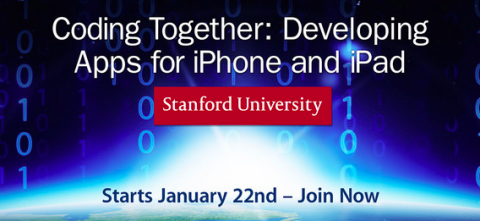
Just a quick fyi. In the past week, Stanford has launched the latest version of Coding Together, the popular course that teaches Stanford students — and now students worldwide — how to build apps for the iPhone and iPad. Taught by Paul Hegarty, the latest version of the free course focuses on how to build apps in iOS 6, and the lectures will be gradually rolled onto iTunes from January 22 through March 28. Find the first lectures here.
We told you in the fall about the album released by Beck and a troupe of other musicians to celebrate composer Philip Glass’s 75th birthday. Rework—Philip Glass Remixed is a collection of Glass works by artists including Beck, Tyondai Braxton, and Cornelius. Turns out that Glass himself was pretty turned on by the results. In the above video, Glass plays around with his own music using an interactive “Glass Machine” app, designed to complement the album.
You can almost see the wheels in Glass’s head turning as he swipes and taps away on the screen, creating new loops with phrases from his own music.
The app that Glass enjoys so much is available to anyone with an iPad, iPod touch or iPhone (3Gs or newer) and $10. The Rework app was designed by Scott Snibbe, who also created the interactive galaxy in Bjork’s Biophilia app.
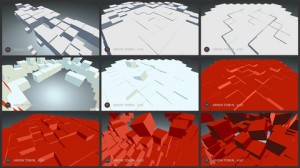
The app includes eleven interactive visualizations of remixed songs from the Rework album (example on left) and a Glass Machine, allowing users to create their own Glass-inspired music.
As Glass himself said, while playing with the Machine, “the user has become the artist.”
Santa left a new Kindle, iPad or other media player under your tree. He did his job. Now we’ll do ours. We’ll tell you how to fill those devices with free intelligent media — great books, movies, courses, and all of the rest. And if you didn’t get a new gadget, fear not. You can access all of these materials on the good old fashioned computer. Here we go:
Free eBooks: You have always wanted to read the great works. And now is your chance. When you dive into our Free eBooks collection you will find 375 great works by some classic writers (Dickens, Dostoevsky, Shakespeare and Tolstoy) and contemporary writers (F. Scott Fitzgerald, Philip K. Dick, Isaac Asimov, and Kurt Vonnegut). The collection also gives you access to the 51-volume Harvard Classics.
If you’re an iPad/iPhone user, the download process is super easy. Just click the “iPad/iPhone” links and you’re good to go. Kindle and Nook users will generally want to click the “Kindle + Other Formats links” to download ebook files, but we’d suggest watching these instructional videos (Kindle –Nook) beforehand.
Free Audio Books: What better way to spend your free time than listening to some of the greatest books ever written? This page contains a vast number of free audio books, including works by Arthur Conan Doyle, James Joyce, Jane Austen, Edgar Allan Poe, George Orwell and more recent writers — Italo Calvino, Vladimir Nabokov, Raymond Carver, etc. You can download these classic books straight to your gagdets, then listen as you go.
[Note: If you’re looking for a contemporary book, you can download one free audio book from Audible.com. Find details on Audible’s no-strings-attached deal here.]
Free Online Courses: This list brings together over 600 free online courses from leading universities, including Stanford, Yale, MIT, UC Berkeley, Oxford and beyond. These full-fledged courses range across all disciplines — history, physics, philosophy, psychology and beyond. Most all of these courses are available in audio, and roughly 75% are available in video. You can’t receive credits or certificates for these courses (click here for courses that do offer certificates. But the amount of personal enrichment you will derive is immeasurable.
Free Movies: With a click of a mouse, or a tap of your touch screen, you will have access to 500 great movies. The collection hosts many classics, westerns, indies, documentaries, silent films and film noir favorites. It features work by some of our great directors (Alfred Hitchcock, Orson Welles, Andrei Tarkovsky, Stanley Kubrick, Jean-Luc Godard and David Lynch) and performances by cinema legends: John Wayne, Jack Nicholson, Audrey Hepburn, Charlie Chaplin, and beyond. On this one page, you will find thousands of hours of cinema bliss.
Free Language Lessons: Perhaps learning a new language is high on your list of 2013 New Year’s resolutions. Well, here is a great way to do it. Take your pick of 40 languages, including Spanish, French, Italian, Mandarin, English, Russian, Dutch, even Finnish, Yiddish and Esperanto. These lessons are all free and ready to download.
Free Textbooks: And one last item for the lifelong learners among you. We have scoured the web and pulled together a list of 150 Free Textbooks. It’s a great resource particularly if you’re looking to learn math, computer science or physics on your own. There might be a diamond in the rough here for you.
Thank Santa, maybe thank us, and enjoy that new device.…
In 1960, NASA put its first “Earth-observing environmental satellite” into orbit, and, ever since, these satellites have let us observe the dynamics of our planet in a new way. They can tell us all about changing weather patterns, the impact of climate change, what’s happening in the oceans, the coastlines, rivers and more.
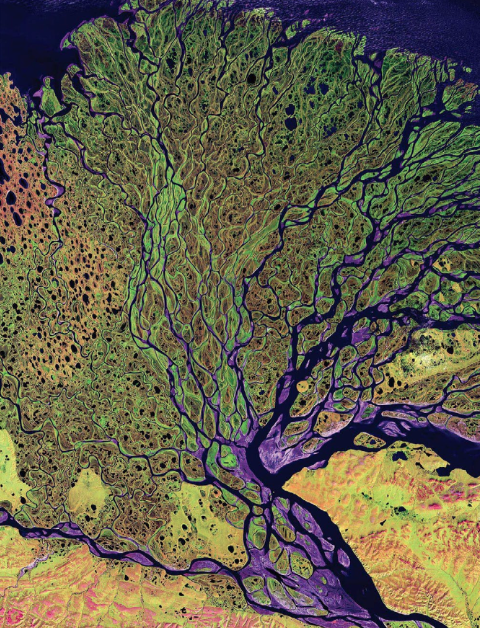
The satellites have also demonstrated again and again the Earth’s aesthetic beauty, revealed in the patterns, shapes, colors, and textures seen from space. That beauty is what gets celebrated in NASA Earth As Art, a new visual publication made available as a Free 160-Page eBook (PDF) and a Free iPad App. Featuring 75 images in total, the app gives you a very aerial look at places like the Himalayas, Arizona’s Painted Desert, the Lena River Delta in Russia (shown above), the Byrd Glacier in Antarctica, and much more. Enjoy the images, from the surreal to the sublime.
You’ll find NASA Earth As Art listed in our collection of Free eBooks. Also see these related NASA materials:
Now running through my speakers, even as I write this: Brian Eno’s latest album, Lux. The disc offers four pieces of ambient music, a style that, even if Eno didn’t technically invent it, he certainly took it to a new level of fascination and popularity. He composed these tracks — if “composed” is indeed the word — as generative music, a process rather than a style, but one he named and has promoted since the nineties. For a definition of generative music, I turn to Eno’s A Year with Swollen Appendices, a book that does not leave my nightstand. “One of my long-term interests has been the invention of ‘machines’ and ‘systems,’ ” he writes, “to make music with materials and processes I specified, but in combinations and interactions I did not. My first released piece of this kind was Discreet Music (1975), in which two simple melodic cycles of different durations separately repeat and are allowed to overlay each other arbitrarily.”
In Lux, we have the latest iteration of that musical model. But even if this new record or its predecessors won’t make your playlist, there’s at least one Brian Eno composition with which you’ll already feel intimately familiar. I refer, of course, to the Windows 95 startup sound. Eno describes the musical challenge as follows: “The thing from the agency said,‘We want a piece of music that is inspiring, universal, blah- blah, da-da-da, optimistic, futuristic, sentimental, emotional,’ this whole list of adjectives, and then at the bottom it said ‘and it must be three and one quarter seconds long.’ ”
From that list of 150 vague words, Eno crafted 84 miniature pieces of music. You may have heard the one Microsoft ultimately went with hundreds, or thousands, of times. Obviously they’ve sounded the same on every play, and this very fact displeases their creator, especially when he creates with generative systems in the first place. “What I always wanted to do was sell the system itself, so that a listener would know that the music was always unique,” Eno continues in A Year. “With computer technology I began to think there might be a way of doing it.” Computer technology, which has come a long way since the days of Windows 95, has brought us to the release of Scape, the first generative music iPad app ($5.99) from Eno and Peter Chilvers. “The idea is that you assemble pieces of music out of sonic building blocks — we call them ‘elements’ — which then respond intelligently to each other,” Eno says in the introductory video just above. Scape follows Bloom and Trope, the duo’s previous generative music apps for the iPhone. Does it strike you as strange that the man behind such an iconic Microsoft theme now releases apps only for Apple devices? It’s no big surprise: Eno even composed the Windows 95 sound on a Mac.
We at Open Culture have discovered a handy piece of software that will make it easier to use our collection, 600 Free eBooks for iPad, Kindle & Other Devices. Calibre is a free e‑book library management software that lets users convert e‑books from one format to another.
Say that you’ve downloaded Jane Austen’s Pride and Prejudice in the open ePUB format and want to move the book onto your Kindle. Calibre can convert the text into all of the major e‑reader formats, including Kindle’s proprietary format. The program will then sync the text to your device and you’re good to go.
Calibre supports e‑book formats used by major manufacturers (including Amazon, Apple, Barnes & Noble and Sony), but if your device isn’t listed in the program’s list, Calibre’s “generic device” option will most likely do the job.
The program also offers a default viewer for reading texts on your computer, and books can be converted from one platform to another, making it easy to move books from your phone to iPad to laptop and beyond.
Calibre fills a niche for e‑book readers, providing a simple way to manage e‑libraries. The program also helps manage and organize online magazines, newspapers and other reading materials. Click “Fetch News” and Calibre will scan selected online news outlets and catalog them in your collection.
You can even buy books by using Calibre’s interface to search for the best price on a selected title.
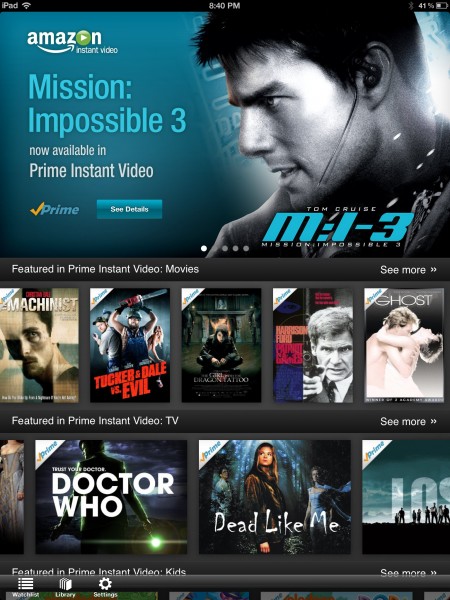
When Amazon launched Amazon Prime in 2005, it didn’t offer that much in the way of benefits — just free shipping on Amazon goods. Now if you pony up $79 per year, you get some good cultural perks: You can borrow over 145,000 e‑books and read them on your Kindle and devices with Kindle apps. What’s more, you can stream thousands of movies and TV shows through your computer, select blu-ray players and now … drum roll please .… the iPad. Just yesterday, Amazon released its free iPad app, which means that Prime members can start streaming movies on their tablets right away. If you’re not a member, you can always try out a one month Free Trial to Amazon Prime. And if that doesn’t move you, you can simply dive into our collection of 500 Free Movies Online. Ars Technica has more details on the pros and cons of the app here.
“My mistress’ eyes are nothing like the sun,” begins Sonnet 130 by William Shakespeare. But why read the rest when you can see and hear it, in the video above, from Stephen Fry? No matter how often I’ve wished the voice inside my head could sound like his, I just can’t master intracranially replicating his distinctive combination of accent and manner. This deficiency bothers me especially when reading works as worthy as Shakespeare’s sonnets. Sonnet 130 in particular, a satire of the increasingly and obviously hyperbolic odes to female beauty popular in Shakespeare’s day, practically demands a persona as dryly knowing as Fry’s. But neither Fry in any of his work nor the Shakespeare of Sonnet 130 seem content to simply pop balloons of grotesquely overinflated sentiment. They know that, in refusing to trot out grandly tired comparisons of lips to coral and cheeks to roses, they pay their subjects a more lasting, genuine tribute in the end.
Fry’s reading comes from a new iPad app, Shakespeare’s Sonnets. In an apparent realization of all those literary “multimedia experiences” we dreamed of but could never quite achieve in the mid-nineties, it presents the 154 sonnets as they looked in their 1609 quarto edition with scholarly notes, commentary, and interviews with experts. Other performers enlisted to read them include Patrick Stewart (presumably another sine qua non for such a project), David Tennant, and — because hey, why not — Kim Cattrall. A fine idea, but new-media visionaries should take note that I and many others are even now waiting for apps dedicated to nothing more than Stephen Fry reading things. Someone’s got to capitalize on this demand.
We're hoping to rely on loyal readers, rather than erratic ads. Please click the Donate button and support Open Culture. You can use Paypal, Venmo, Patreon, even Crypto! We thank you!
Open Culture scours the web for the best educational media. We find the free courses and audio books you need, the language lessons & educational videos you want, and plenty of enlightenment in between.
 Just a quick fyi. In the past week, Stanford has launched the latest version of Coding Together, the popular course that teaches Stanford students — and now students worldwide — how to build apps for the iPhone and iPad. Taught by Paul Hegarty, the latest version of the free course focuses on how to build apps in iOS 6, and the lectures will be gradually rolled onto iTunes from January 22 through March 28. Find the first lectures here.