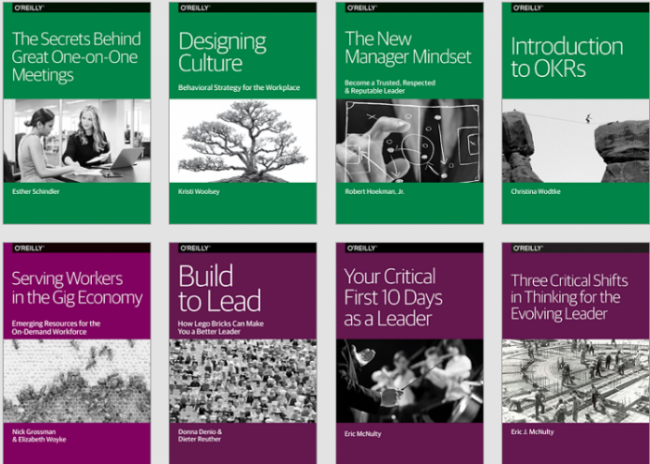
Last week we highlighted for you 20 Free eBooks on Design from O’Reilly Media. Little did we know that we were just scratching the surface of the free ebooks O’Reilly Media has to offer.
If you head over to this page, you can access 243 free ebooks covering a range of different topics. Below, we’ve divided the books into sections (and provided links to them), indicated the number of books in each section, and listed a few attractive/representative titles.
You can download the books in PDF format. An email address–but no credit card–is required. Again the complete list is here.
If you would like to support the mission of Open Culture, consider making a donation to our site. It’s hard to rely 100% on ads, and your contributions will help us continue providing the best free cultural and educational materials to learners everywhere. You can contribute through PayPal, Patreon, and Venmo (@openculture). Thanks!
FYI: Early last week, Colin Marshall gave you a heads up that Studio Ghibli, the animation studio behind Hayao Miyazaki’s My Neighbor Totoro, Princess Mononoke, and Spirited Away, was preparing to release an open source version of the animation software used to create its films. This weekend, the software–called OpenToonz–officially became available for download. And we can now tell you where to find it. OpenToonz is available on Github, in versions made for both Window and OSX. This link will jump you straight to the download area.
If you make anything great with it, please share it with us.
If you would like to support the mission of Open Culture, consider making a donation to our site. It’s hard to rely 100% on ads, and your contributions will help us continue providing the best free cultural and educational materials to learners everywhere. You can contribute through PayPal, Patreon, and Venmo (@openculture). Thanks!
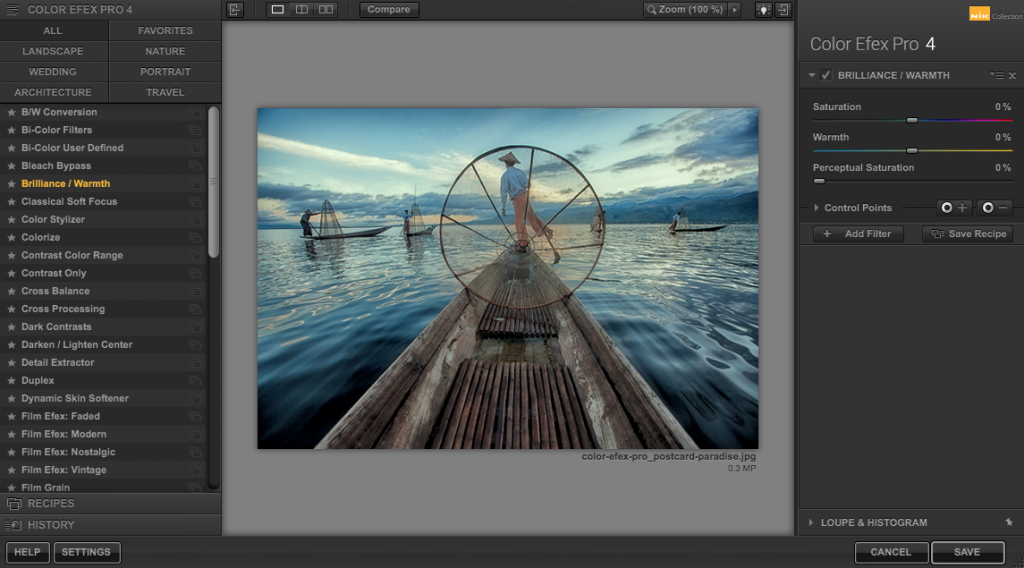
Google’s Nik Collection, a photo editing software package designed for professional photographers, once retailed for $149. Today it’s absolutely free to download, for both Windows and Mac users.
Here you can read Google’s announcement, which includes more information on the software package and its capabilities.
Today we’re making the Nik Collection available to everyone, for free.
Photo enthusiasts all over the world use the Nik Collection to get the best out of their images every day. As we continue to focus our long-term investments in building incredible photo editing tools for mobile, including Google Photos and Snapseed, we’ve decided to make the Nik Collection desktop suite available for free, so that now anyone can use it.
The Nik Collection is comprised of seven desktop plug-ins that provide a powerful range of photo editing capabilities — from filter applications that improve color correction, to retouching and creative effects, to image sharpening that brings out all the hidden details, to the ability to make adjustments to the color and tonality of images.
Starting March 24, 2016, the latest Nik Collection will be freely available to download: Analog Efex Pro, Color Efex Pro, Silver Efex Pro, Viveza, HDR Efex Pro, Sharpener Pro and Dfine. If you purchased the Nik Collection in 2016, you will receive a full refund, which we’ll automatically issue back to you in the coming days.
We’re excited to bring the powerful photo editing tools once only used by professionals to even more people now.
Once you’ve downloaded the software, head over to the Nik Collection channel on YouTube where you’ll find video tutorials, including the one below called “Introduction to the Nik Complete Collection.” It’s a good place to start.
PS: Some readers have asked whether this software can work as a standalone program, or whether it needs to run with a program like Photoshop. Here’s what PC Magazinehas to say about that: “Though you can run the seven different plugins in the collection as standalone products, they tend to work better when you integrate them into an existing image editing program, like Adobe’s PhotoShop. ‘(On Windows) You can make shortcuts to the individual .exe files on your desktop and then just drag stacks of images onto them,’ suggested one Google+ user.” In short, you have some options.
If you would like to support the mission of Open Culture, consider making a donation to our site. It’s hard to rely 100% on ads, and your contributions will help us continue providing the best free cultural and educational materials to learners everywhere. You can contribute through PayPal, Patreon, and Venmo (@openculture). Thanks!
By now we all know the name of Studio Ghibli, the operation responsible for such animated-feature-film-redefining productions as Grave of the Fireflies and Hayao Miyazaki’s My Neighbor Totoro, Princess Mononoke, and Spirited Away. But unless we’ve paid a visit to the Ghibli Museum, seen the documentary The Kingdom of Dreams and Madness, or taken part in the close scrutiny to which Ghibli fans subject the studio’s every public move, we won’t know much about their methods for crafting such visually and emotionally captivating stories. Soon, though, we’ll be able to use their tools ourselves. On March 26, you will be able to download OpenToonz, an open source version of the Toonz software used by Studio Ghibli.
“Included in the OpenToonz are many of Ghibli’s custom tools, specially designed to capture trees waving in the breeze, food that looks too delicious to eat, and the constant running Miyazaki’s films are known for,” writes The Creators Project’s Beckett , who quotes Ghibli’s Executive Imaging Director Atsushi Okui on why they started using the Italian-developed package in the first place: “We needed a software enabling us to create a certain section of the animation digitally. Our requirement was that in order to continue producing theatre-quality animation without additional stress, the software must have the ability to combine the hand-drawn animation with the digitally painted ones seamlessly.” Toonz, evidently, could pull it off.
Ghibli began using the software in 1995, during the production of Princess Mononoke, and has kept using it since. In fact, reports Amid Amidi at Cartoon Brew, “the new OpenToonz is dubbed ‘Toonz Ghibli Edition’ because of all the custom-features that Toonz has developed over the years for the legendary Japanese studio.” With Miyazaki retired, at least from feature-film animation, and nobody quite sure whether 2014’s When Marnie Was There will be the studio’s last picture, as good a time as any has come for successors to the Ghibli tradition. If you’d like to throw your own hat into that enormous ring, you can download OpenToonz for free on March 26, 2016 (or, for a price, buy Toonz Premium) from the official Toonz web site.
Physicist Stephen Hawking may trump them all, though his famously recognizable voice is not organic. The one we all associate with him has been computer generated since worsening Amyotrophic lateral sclerosis, aka Lou Gehrig’s disease, led to a tracheotomy in 1985.
Without the use of his hands, Hawking controls the Assistive Context-Aware Toolkit software with a sensor attached to one of his cheek muscles.
Recently, Intel has made the software and its user guide available for free download on the code sharing site, Github. It requires a computer running Windows XP or above to use, and also a webcam that will track the visual cues of the user’s facial expressions.
The multi-user program allows users to type in MS Word and browse the Internet, in addition to assisting them to “speak” aloud in English.
The software release is intended to help researchers aiding sufferers of motor neuron diseases, not pranksters seeking to borrow the famed physicist’s voice for their doorbells and cookie jar lids. To that end, the free version comes with a default voice, not Professor Hawking’s.
Ayun Halliday is an author, illustrator, and Chief Primatologist of the East Village Inky zine. Her play, Fawnbook, is currently playing in New York City. Follow her @AyunHalliday
Yes, you can help save the world. And just by downloading some free software. Writes NASA:
Protecting the Earth from the threat of asteroid impacts means first knowing where they are. NASA is harnessing the incredible potential of innovators, makers and citizen scientists by opening up the search. In an increasingly connected world, NASA recognizes the value of the public as a partner in addressing some of the country’s most pressing challenges. We need your help in identifying asteroids – and to help further this effort, we’ve built an application that enables everyone, everywhere, to help solve this global challenge.
To download the app and join the hunt for asteroids, please click here. To get more information on the project (in which Harvard is a strategic participant) click here.
Note: If you’re having difficulties getting this software running in your browser give Firefox a try. It seems to work the best.
Movies, commercials, radio shows, even books: we’ve enjoyed the ability to effortlessly pull up things we remember from our childhood on the internet just long enough that it feels strange and uncomfortable when we can’t. Up until now, though, we haven’t had an easy way to re-experience the computer software we remember using in decades past. In my case, of course — and likely in a fair few of yours as well — I spent most of my computer time in decades past playing games and not, say, building balance sheets. But whichever you did, the Internet Archive’s newly opened Historical Software Archive makes it easy to re-live those old days at the keyboard without having to buy a vintage computer on eBay, track down its software, remember all its required commands and keystrokes, and hope the floppy discs — or, heaven help us, cassette tapes — boot up correctly. They’ve made these wealth of games, applications, and oddities freely available with the development of JMESS, a Javascript-powered version of the Multi Emulator Super System, “a mature and breathtakingly flexible computer and console emulator that has been in development for over a decade and a half by hundreds of volunteers.”
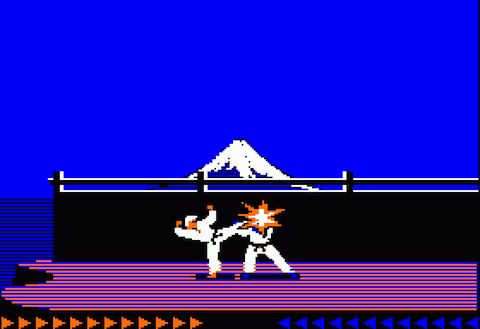
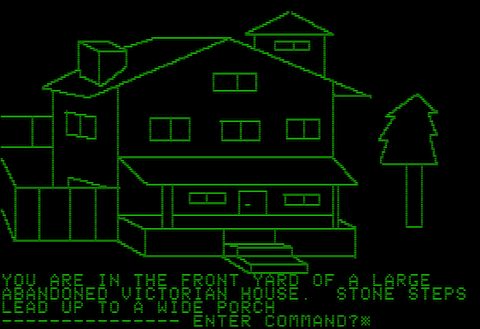
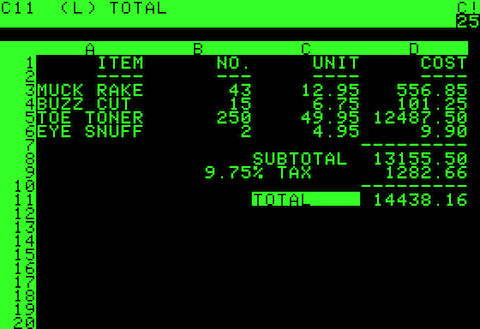
They say a bit more about the technology behind all this on the Internet Archive Blog, and the Historical Software Archive’s front page offers recommendations for which “ground-breaking and historically important software products” to try first, including 1.) Jordan Mechner’s Karateka (top), a hot game in 1980 and the most popular item in the archive today; 2) Sierra On-Line’s Mystery House (above), which gave rise more or less by itself to a vast genre of graphic adventures; 3) three adaptations of Namco’s Pac-Man (one for the Atari 2600, one remade for that same console, one lawsuit-inducing knockoff for the lesser-known Odyssey2); 4) E.T. the Extra-Terrestrial, a “1982 adventure video game developed and published by Atari, Inc. for the Atari 2600 video game console;” and 5) Dan Bricklin and Bob Frankston’s Visi-Calc (below), the granddaddy of all spreadsheet programs, and arguably the single application that turned computing from hobby into necessity. Or how about 6) WordStar, the early word processing program? Just click on the “Run an in-browser emulation of the program” link to fire up any of these and, if you’re under about 30, experience just what computer users of the late seventies and early eighties had to deal with — and how much fun they had.
We at Open Culture have discovered a handy piece of software that will make it easier to use our collection, 600 Free eBooks for iPad, Kindle & Other Devices. Calibre is a free e‑book library management software that lets users convert e‑books from one format to another.
Say that you’ve downloaded Jane Austen’s Pride and Prejudice in the open ePUB format and want to move the book onto your Kindle. Calibre can convert the text into all of the major e‑reader formats, including Kindle’s proprietary format. The program will then sync the text to your device and you’re good to go.
Calibre supports e‑book formats used by major manufacturers (including Amazon, Apple, Barnes & Noble and Sony), but if your device isn’t listed in the program’s list, Calibre’s “generic device” option will most likely do the job.
The program also offers a default viewer for reading texts on your computer, and books can be converted from one platform to another, making it easy to move books from your phone to iPad to laptop and beyond.
Calibre fills a niche for e‑book readers, providing a simple way to manage e‑libraries. The program also helps manage and organize online magazines, newspapers and other reading materials. Click “Fetch News” and Calibre will scan selected online news outlets and catalog them in your collection.
You can even buy books by using Calibre’s interface to search for the best price on a selected title.
We're hoping to rely on loyal readers, rather than erratic ads. Please click the Donate button and support Open Culture. You can use Paypal, Venmo, Patreon, even Crypto! We thank you!
Open Culture scours the web for the best educational media. We find the free courses and audio books you need, the language lessons & educational videos you want, and plenty of enlightenment in between.