The folks at Apple have rolled out an intriguing new podcast that takes you inside the world of moviemaking. The Set to Screen Series (get it on iTunes here) follows Baz Luhrmann, the Oscar-nominated director (Moulin Rouge! and William Shakespeare’s Romeo+Juliet) as he works on a new film. And every three weeks, from now through October, a new video podcast will be released that shows you how films get made. On-set still photography, costume design, cinematography, scoring — it all gets covered here. And yes, of course, this podcast is all in video. You can get more info on this project here.

The iPhone and the 21st Century University
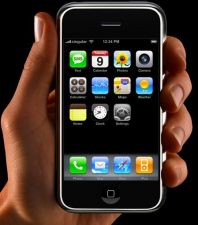 Next fall, all new freshmen attending ACU (Abilene Christian University) will receive an iPhone (or iPod Touch) when they get to campus. And, from there, the Apple gadget will figure centrally to students’ campus experience. The iPhone is the latest and greatest “converged mobile media device,” which combines in one gadget numerous functionalities — internet and email access, phone, audio, video, and maps. And once you put a generation of students reared on mobile devices on this common platform, new ways of running the university in the 21st century start to open up.
The changes begin with the way university administration gets done. ACU envisions students using their devices to check their meal and account balances, access course calendars, receive news and special bulletins from the university, and tap into the university phone/employee directory. Not far down the line, the university anticipates that the iPhone will fulfill certain registrar functions — meaning that students can use their iPhone to scope out, and even enroll in, various classes. Then, they’ll add some e‑commerce to the mix and let students use their mobile device to conduct commerce with the bookstore and university restaurants. Are you starting to get the picture? The iPhone becomes a “one stop shop for information and services” that can be accessed on the fly.
But what happens in the classroom? I had a chance to catch up with Bill Rankin, the Director of Mobile Learning Research (and also Associate Professor & Director of English Graduate Studies) who shared some of ACU’s thinking about how the iPhone creates new teaching opportunities. For starters, the device will allow students to access syllabi, course documents (created with Google Docs), homework assignments and podcasts that complement the course. (Imagine students downloading podcasted lectures from previous classes, or listening to clips of Mozart in their music appreciation class, or reviewing bits of French dialogue in the French 101 class.) From here, the pedagogical uses of the iPhone start to deepen. According to Rankin, the Apple gadget will give teachers the ability to conduct real-time surveys that gauge student perceptions of the class (are they understanding the course? is it moving too quickly?) and use the feedback to make the classes “more carefully tailored to the interests and abilities.” It’s also an added perk that the iPhone will let students contribute to the class through their online persona, which, research shows, “emboldens students [particularly shy ones] who might not otherwise share their ideas.” Then there’s this scenario (and others like it): With the iPhone, the “biology class in the field will be able to photograph specimens, post their findings to other classes not currently in the field, communicate with experts, and use the web to identify and research specimens. That’s transformational, and we think it will offer distinct advantages to our students.” Lastly, the iPhone opens up the possibility of creating “hybrid” courses, which means courses conducted partly in the classroom and partly online. For more on the hybrid concept (and other facets of the project), you can watch the video posted on YouTube that introduces ACU’s iPhone initiative. We’ve posted Part 1 below, and you can access Part 2 here. To get more insight into ACU’s intelligent thinking about the potential educational applications of the iPhone, you should spend some time on their “Connected” web site.

10 Ways to Make Your iPod a Better Learning Gadget
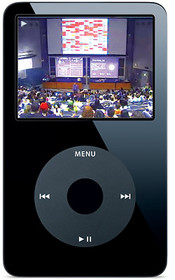 The iPod can supercharge your learning. But it’s often a matter of finding the right software and content. Below, we’ve listed several new pieces of software that will let you suck more educational media (DVDs, web videos, audio files, etc.) into your iPod. And we’ve also listed some important pieces of content that will make your iPod a better learning gadget. So here it goes and be sure to visit our Podcast Library and our related piece 10 Signs of Intelligent Life at YouTube:
1) Put Wikipedia on Your Ipod: Encyclopodia is a free piece of software that brings Wikipedia to the iPod. Encyclopodia can be installed on iPod generations 1 through 4, as well as iPod Minis. Definitely worth a try.
2) Watch DVDs on Your iPod: This free, open source software works on MacOS X, Linux and Windows, and makes it simple to load and watch DVDs on your video iPod. Here are some helpful instructions to get you started.
3) Load YouTube Videos to Your iPod: ConvertTube allows you to take any YouTube video and convert it to a format that works on your iPod. It’s as simple as entering a url and clicking “convert and download.” If you want to give the software a test run, try converting these UC Berkeley courses that were recently launched on YouTube. Or these Nobel Prize speeches.
4) Make Other Video Formats iPod-Ready: Lifehacker recently mentioned three other pieces of software that will make a variety of other video formats iPod-ready. For Windows, see Videora; for Mac, see iSquint. Or more generally see Zamzar. In a nutshell, these items will turn a wide range of video formats into the one video format (MPEG‑4) that your iPod likes.
5) Convert MP3 files into One Big iPod Audiobook File: Downloading free audiobooks can often require you to work with a series of separate mp3 files, which can make things rather cumbersome. This software does you a favor and mashes the files into one manageable file. And it has a feature that will let your Ipod remember where you stopped if you decide to take a break. (If this one appeals to you, be sure to see item # 10.)
6) Create eBooks for the iPod: This bit of software turns text files into ebooks that you can read on your iPod. After you load a text file, it will make the text readable through iPod Notes (which you can find under “Extra Setttings”). Then, voila, a portable text. Thanks to Pachecus.com for pointing this one out.
How to Extend the Life Of Your iPod Battery
For those who use their iPod to take advantage of our copious podcast collections:
via Lifehacker

Steve Jobs’ 90 Minute Keynote Boiled Down to 60 Seconds
Want the quick overview of what Apple has in the pipeline for ’08? Here it is:
Ipod Radio
The Ipod Radio Remote — Here’s a small gadget worth checking out. Simply attach it to your iPod and you can start listening to the radio (something that always seemed missing). I just got one, and it works really well. So I figured that I’d give it a quick plug. In case you’re interested, Amazon sells it cheaper than Apple, although you may want to read the reviews on the Apple site.
Related Content:
10 Ways to Make Your iPod a Better Learning Gadget
Andy, Are You Goofing on Apple?
 Fake Steve Jobs, a wildly popular blog written by Daniel Lyons, an editor at Forbes, has been goofing on the real Steve Jobs all year. And now things have taken an odd turn. During the same week that Apple apparently shut down ThinkSecret.com (an Apple rumor site) in exchange for cash, Apple may be applying similar pressure to Fake Steve Jobs. Or maybe not.
If today’s blog post can be taken at face value, Apple lawyers have followed up hard-assed threats with a cash offer (of $500,000) to make FSJ go away. The recent posts all sound convincing. But then you note the references to Andy Kaufman, the master of walking the line between complete sincerity and absurdity. First, there’s the picture of Kaufman getting strong armed during one of his famous wrestling matches with women. Next, there’s the reference to a “Tony Clifton,” which is the name given to a strange bit character Kaufman played during the 1970s (see below).
FSJ is a satire site, and you shouldn’t get fooled. But you do. Just like the inevitable dupe does every April 1. Good stuff.
The iPod Deathclock
How many days, weeks or months before your iPod goes kaput? This web site will give you an estimate. Perhaps a handy tool for anyone who consumes all of the podcasts that we throw your way.
Check out our collection of Ideas & Culture Podcasts
Support Us
We're hoping to rely on loyal readers, rather than erratic ads. Please click the Donate button and support Open Culture. You can use Paypal, Venmo, Patreon, even Crypto! We thank you!

About Us

Open Culture scours the web for the best educational media. We find the free courses and audio books you need, the language lessons & educational videos you want, and plenty of enlightenment in between.
Advertise With Us


